Finding one specific conversation you had with ChatGPT three weeks ago can feel like searching for a needle in a haystack. As one heavy user put it in a Chrome Web Store review: "I have over a thousand chat threads on ChatGPT... finding old conversations felt like searching for a needle in a haystack." If you use AI chat every day for coding, writing, or research, your history becomes a knowledge base — one you currently can't search properly.
This guide covers the three practical ways to search your ChatGPT history, what each one misses, and the paywall trick to watch out for before you install any "free" search extension.
Why ChatGPT's built-in search falls short
ChatGPT does have a search box in the sidebar, but daily users run into the same three walls:
- Shallow title matching. Search primarily surfaces conversation titles and recent chats. A keyword buried in the middle of a three-month-old conversation often never comes up.
- No advanced filters. You can't filter by date range or search only your own prompts versus the assistant's answers.
- One platform at a time. Your Claude, Gemini, and Perplexity conversations each live in their own silo with their own (equally limited) search.
Method 1: Scroll and Ctrl+F (free, painful)
The zero-install approach: scroll the sidebar until the conversation loads, open it, and use your browser's find-in-page (Ctrl+F / Cmd+F). It works for something from yesterday. For anything older, sidebar loading gets slower the deeper you scroll, and find-in-page only searches the single conversation you already found — which is the hard part.
Method 2: Export your data and search locally
ChatGPT can email you a full export: Settings → Data Controls → Export Data. You get a ZIP with your entire history as JSON and HTML files that you can search on your computer.
This is genuinely useful as a backup, but as a search workflow it's slow: the export takes minutes to arrive, it's a snapshot that goes stale immediately, and grepping raw JSON is nobody's idea of "finding that recipe from March."
| Method | Speed | Coverage | Freshness |
|---|---|---|---|
| Scroll + Ctrl+F | Slow | One chat at a time | Live |
| Data export | Very slow | Full history | Stale snapshot |
| Search extension | Instant | Full history, all platforms | Live |
Method 3: Use a history search extension — but read the fine print
Dedicated Chrome extensions index your conversations locally and give you instant full-text search. This is the right tool for the job — but the category has a trust problem, and it shows up in the reviews of the most popular options:
"Doesn't search more than your last 20 conversations without hitting a $10 paywall! There is NO mention of a paid model in the extension description." — 1-star review of a popular chat search extension
"Downloaded 1200 conversations only to search in the last 20." — another 1-star review, same extension
Three things to check before installing any chat search extension:
- Is search actually unlimited? Several "free" extensions index everything, then only search your most recent 20 conversations until you pay. If the store listing doesn't say "no limits," assume there are some.
- Does it search message content, not just titles? A common complaint: "It cannot search the content of each chat. It's kind of useless if you are looking for a keyword in the content of some long ago chat."
- Where does your data go? Search doesn't require uploading your conversations anywhere. Prefer extensions that build the index locally in your browser and never send chat content to a server.
Searching ChatGPT, Claude, Gemini and Perplexity in one place
If you use more than one AI assistant, per-platform search means remembering where you asked something before you can even look for it. A multi-platform history search fixes that: one search box, results from every AI chat site you use, with matches highlighted so you can jump straight to the exact message.
That's exactly what we built ChatGPT History Search to do:
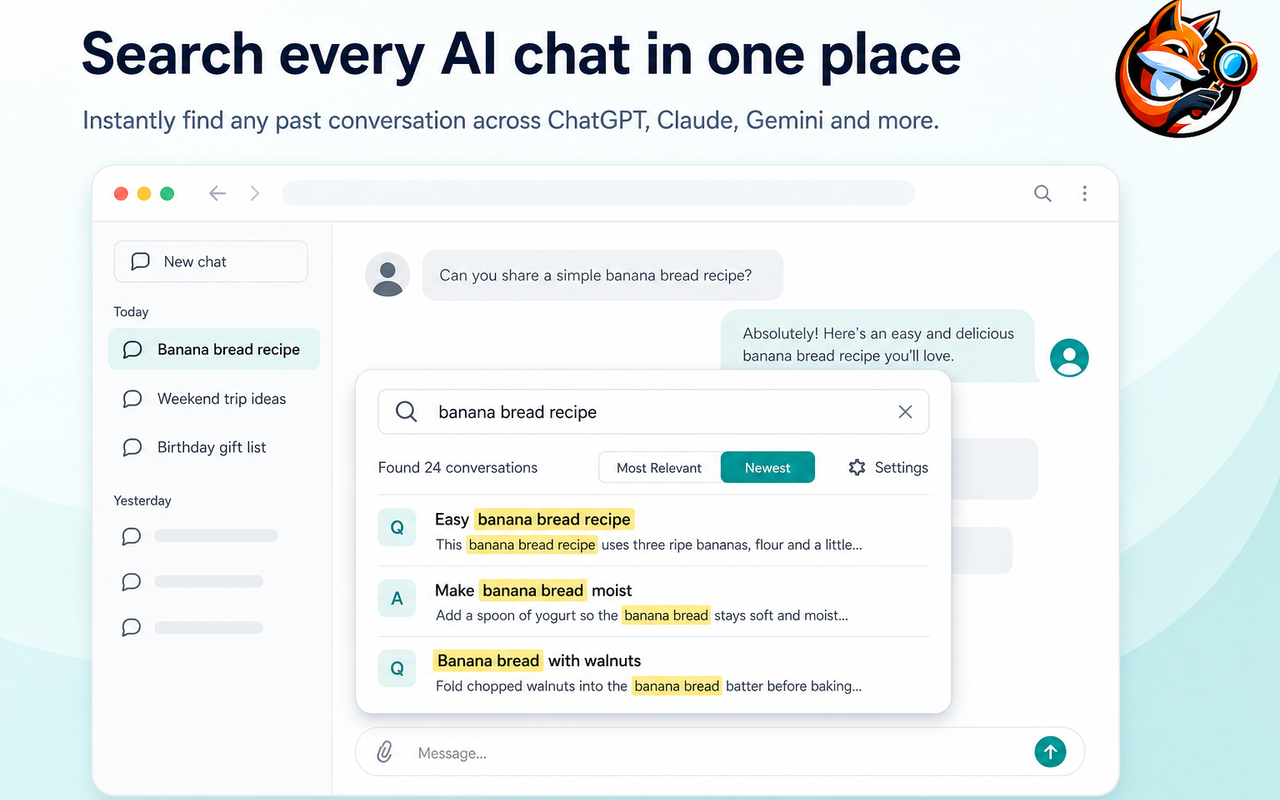
- Full-text search across conversation titles, your prompts, and AI answers — not just titles.
- Works on ChatGPT, Claude, Gemini, DeepSeek and more, so one search covers your whole AI history.
- 100% local index. Your chat history is stored and searched in your own browser; nothing is uploaded to an external server.
- Jump to the message. Every match is highlighted, and clicking a result opens the original conversation.

The bottom line
For a one-off lookup of something recent, Ctrl+F will do. For an archive you own, request a data export once in a while. But if your ChatGPT history is something you actually use — prompts you want to reuse, answers you paid tokens for, research you don't want to redo — a local, unlimited, full-text search extension is the only method that makes your entire history usable in seconds.