Open a new tab roughly 30–100 times a day, and it's the single most-viewed screen in your entire browser — more than any website you actually visit on purpose. That makes it a genuinely good spot for a to-do list: something you'll see constantly without having to remember to check it. Which is exactly why "new tab dashboard" is one of the most crowded categories in the Chrome Web Store — and, according to a lot of reviews, one of the most bloated.
Here's what to watch for before installing one, and how to get the simple version: your tasks, every time you open a tab, nothing else.
Why new tab dashboards quietly became a bloated category
A new tab extension has unusually broad reach — it runs every time you open a tab — which makes it an attractive place to bolt on widgets, wallpapers, AI chat, calendars, habit trackers, and eventually a subscription tier. One reviewer summed up the pattern better than any product page could: "很多优秀产品口碑都是始于专注固定领域,死于想要大而全" — roughly, a lot of well-loved products build their reputation doing one thing well, then lose it trying to become everything at once.
Red flags to check before installing one
New tab extensions have an unusually wide blast radius since they load on every single tab, so it's worth a quick check before installing:
- Unexplained ad injection. Reviews of a popular new tab extension describe ads appearing that weren't previously there: "每次打开都会弹一次广告" (an ad popping up on every open).
- Silent link rewriting. The same extension was flagged for replacing outbound shopping links with affiliate-tracked ones without disclosure — one review specifically named a major retailer's link getting swapped for a tracking domain.
- Requested permissions that don't match the feature set. If a to-do list extension asks for permission to read and modify data on every site you visit, that's a mismatch worth questioning.
The paywall trap
The second pattern shows up after you've already invested time customizing the thing. A reviewer of a popular new-tab dashboard put it directly: "I spent hours customising it to my uni schedule only to hit a paywall" — and another reported the free tier capping something as basic as the number of shortcuts you're allowed to add. A different competitor's reviewer described the business model bluntly: "Make it free — Gain 5 star reviews and then make everything paid." None of this shows up until you're already relying on the tool daily.
What people actually want: a fast to-do list, not a dashboard
Strip away the widgets, wallpapers, and AI chat panels, and the actual, most common request in new tab extension reviews is much simpler — a place to jot down tasks that's just there every time you open a tab, with nothing to configure and nothing blocking the basics. One reviewer of a smaller, more focused to-do extension said it plainly after a feature got removed: "Your new update removes the feature of disabling the todo list being opened in new tab, I was loving it before" — confirming that the core idea (new tab is the to-do list) is exactly what a segment of users want, they just want it done well.
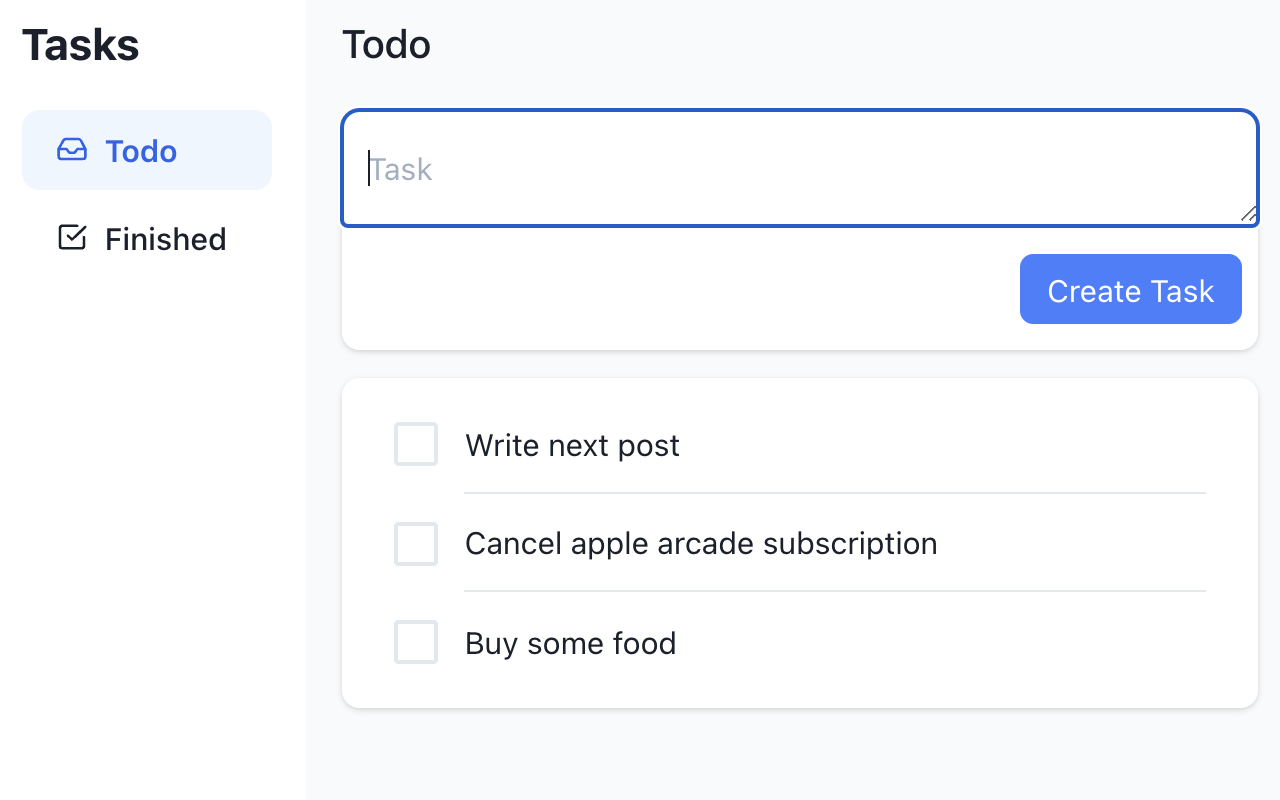
Quick Todo Tab is built around that one job: replace your new tab page with a task list, and stop there. Type a task, hit create, check it off when it's done — no dashboard, no wallpaper picker, no AI assistant panel competing for space with your actual list.
Keeping your list synced without losing tasks on update
A separate, recurring complaint about popular new tab extensions is settings and content resetting unexpectedly — one review of a well-known option described it losing customization "every day," reverting to defaults on every browser restart. Quick Todo Tab syncs your tasks through your Chrome account (chrome.storage.sync), so the same list follows you to another computer signed into the same profile, rather than living in one browser's local storage where an update or a fresh install can wipe it.
No ads, no paywall, no bloat
There's no premium tier, no feature gated behind a subscription, and no ad slot competing for space on the one screen you look at more than any other. It's a to-do list — everything it does is available from the first install.
| What to look for | Why it matters |
|---|---|
| No ad injection or link rewriting | New tab extensions have unusually broad reach on every site you visit |
| No feature paywall | Several competitors gate basic shortcuts/tasks behind a subscription |
| Settings that survive updates | A common failure mode: dashboards reset to default after an update |
| Add a due date to a task | Basic planning without needing a full calendar app |
| Nothing beyond a to-do list | Widgets and wallpapers are the reason this category got bloated in the first place |
A 2-minute setup
Install the extension, open a new tab, and start typing — there's no onboarding flow or account setup gating the first task. Add a due date to anything time-sensitive, check items off as you go, and they move to a separate "Finished" view instead of just disappearing, so you can glance back at what you actually got done.
The bottom line
The new tab screen is valuable real estate precisely because you see it constantly — which is exactly why it's worth being deliberate about what lives there. If what you actually want is "see my tasks the second I open a tab," a dedicated, ad-free to-do list beats a bloated dashboard you'll spend more time configuring than using.