The microwave is flashing an error code you've never seen. The IKEA bookshelf came with an instruction sheet that's somehow already gone, three screws in. The universal remote needs a pairing code buried on page 4 of a manual you tossed with the box a year ago. These are small, ordinary moments — and every one of them sends people straight to a search bar typing some version of "[brand] [model] manual pdf."
What they usually get back isn't great: a page of results dominated by ad-heavy re-upload sites, PDFs for the wrong model year, and — if they go looking for a browser extension to make this easier — a handful of "manual finder" tools that turn out to do something else entirely.
Why searching "[model] manual pdf" is a mess
A direct Google search for a manual works, technically, but it comes with friction that adds up: results dominated by third-party document-hosting sites wrapped in multiple layers of ads and download-button decoys, PDFs that turn out to be for a slightly different model number, and manufacturer support pages that bury the actual download three clicks deep behind a product-registration flow. None of it is impossible to work through — it's just slower and more annoying than the two-minute task it should be.
A pattern worth knowing about in the Chrome Web Store
If you've ever searched the Chrome Web Store for a "manual finder" or "find user manual" extension, you may have noticed something odd about the results: several of the most-installed options in this category aren't really built around finding manuals at all. Their own store listings describe features like replacing your new tab page with a custom search page, or setting a different default search engine — with "manual search" folded in as one small feature alongside things like a weather widget or a background-image changer. That's a different product than what someone searching "find user manual online" is actually looking for, and it shows up in unusually low ratings for a category that otherwise serves a genuinely common need.
The practical takeaway: before installing any extension that promises to help you find a manual, it's worth checking exactly what permissions it asks for and what its own description says it changes. An extension that needs to control your new tab page or your default search engine just to look up a PDF is doing more than the name suggests.
What a single-purpose manual lookup tool should actually do
A tool built specifically to solve "find the official manual for this product" should do exactly that and nothing else: take a brand and model (or a product name), search, and hand back links to the relevant manual — without touching your new tab page, your default search engine, or your browsing habits in any other way.
Finding a manual without leaving the page you're on
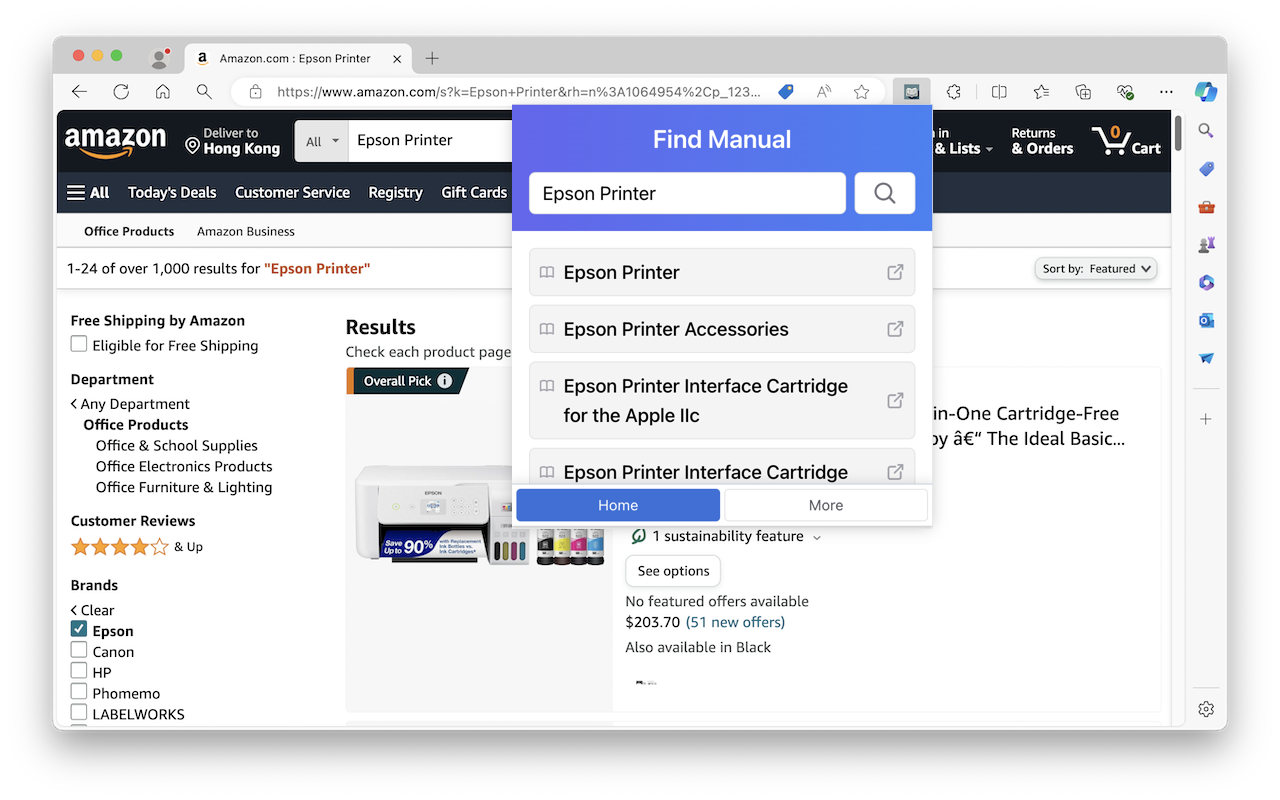
Find Manual works this way: open it from wherever you already are — a shopping page, a search results page, or just the product box sitting in front of you — type the brand and model, and get a results list of manual links without a new tab page takeover or a search engine swap in sight. In the example above, it's triggered right on an Amazon printer listing, with the model pre-filled and ready to search.
Where this actually comes up
The "I need this product's manual" moment is more common than it feels in the moment, because it's spread across every category of thing people own:
- Appliances — error codes on a washer, dryer, dishwasher, or microwave that mean nothing without the manual's troubleshooting table
- Electronics — router reset procedures, TV remote pairing codes, printer setup steps
- Furniture — assembly instructions for flat-pack furniture when the printed sheet gets lost
- Cars — dashboard warning light meanings, tire pressure specs, fuse box diagrams
- Small appliances and toys — battery replacement steps, cleaning instructions, warranty terms
Sketchy manual-finder extensions vs. a single-purpose tool
| Common "manual finder" extension | Find Manual | |
|---|---|---|
| New tab page | Often replaced | Untouched |
| Default search engine | Sometimes changed | Untouched |
| Extra features | Weather, backgrounds, custom search | None — manual search only |
| Store rating pattern | Frequently very low | Focused, single-purpose |
| What you get | A new tab experience with manual search folded in | A direct list of manual links |
FAQ
Does Find Manual change my new tab page or search engine? No — it's a single-purpose lookup tool, not a new-tab or search-engine replacement.
What kinds of products does it cover? Anything with a brand and model name — appliances, electronics, furniture, cars, and general consumer products.
Do I need to leave the page I'm on to use it? No — it opens as a popup wherever you already are, whether that's a shopping site or any other page.
The bottom line
"Find the manual for this thing" is a small, unglamorous need — which is exactly why it's been an easy target for extensions whose real business model is your new tab page or your default search engine. A tool built around the actual task, with nothing else attached, gets you from "what does this error code mean" to the actual PDF in one click, without adding a new tab takeover to your list of problems.